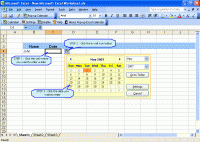
Pop-up Excel Calendar shows you a date picker when you activate a date cell in Excel, so that you can pick or select date value from the calendar by clicking mouse, instead of typing in manually, thus saving time and avoiding format mistakes.
Pop-up Excel Calendar is a date picker for Microsoft Excel. It runs inside Excel and when you activate a cell where a date value muse be entered, it pops up a calendar to let you pick or select a date from the calendar, instead of typing in manually. This helps you save time and avoid common mistakes found in working with date values. For example, Should you enter dd/mm/yy or mm/dd/yy? Do you enter slashes or dashes or dots?
Pop-up Excel Calendar detects date cells based on various conditions, including the format or value of the active cell, the label or format of the above cell, etc. All these are configurable. If a date cell is detected, an in-cell icon button appears, which you can click to pop-up the calendar to pick or select a date value - or, you can set an option to have the calendar pops up automatically. Besides that, you can also activate the calendar manually on any cell by selecting the command from toolbar, context menu, and ribbon tab in Excel 2007. Pop-up Excel Calendar offers options to let you decide where to add the calendar command.
The date picker also provides other useful options. For example, you can set the First Day of Week option to adjust the calendar layout; set the Default Date Format option to have the calendar set a date format if the target cell is not formatted as date. With Custom Formats, you can even control what formats are valid date formats and what are not.
With this new version, the date picker offers a new option that enables the pop-up calendar to show a default date for a target cell. Whats new in version 1.7.7: 1. New feature: The date picker offers a new option that enables the pop-up calendar to show a default date for a target cell. Requirements: Microsoft Excel/Office 2000/XP/2003/2007/2010 Operating system: Win2000,Win7 x32,Win7 x64,WinVista,WinVista x64,WinXP Release notes: Major Update
Integrated with Microsoft Outlook. Set up phone, Email, text message, instant message, and Fax reminders directly from Outlook calendar.
Price: $0, Rating: 9, Downloads: 366 Download
AnyBizSoft PDF to PowerPoint Converter is a powerful PDF converter software which helps you easy to convert multiple PDF files at the same time to editable and dynamic PPT presentations with perfect effects.
Price: $29.95, Rating: 0, Downloads: 165 Download
PDF restrictions remover software unlock PDF security owner password and enables PDF content copying, document printing, form filling and modifying. Decryption tool supports 40-bits/128-bits RC4 and 128-bits AES encrypted PDF files to unrestrict.
Price: $24.95, Rating: 4, Downloads: 147 Download
PDF password security guard, protect your digital property from unauthorized person by securing them with pdf open password, preventing them from printing, text copying, filling, commenting with owner password restrictions and by encrypting.
Price: $19.95, Rating: 5, Downloads: 145 Download
User Rating
Rating:2.2 out of
5 Based on13 ratings.
13 user reviews.

 Pop-up Excel Calendar 1.7.7 details